Drive Wavemaker Workflows from Your AI Agent (MCP Builder Mode)
Connect Cursor, Claude, or any MCP client to Wavemaker's builder surface: draft a workflow in plain language, run any Hub workflow as a typed tool, and train custom models — copy-paste configs included.

Wavemaker’s workflow platform is fully drivable by AI agents over the Model Context Protocol. If your agent lives in Cursor, Claude, Windsurf, or anything MCP-capable, it can draft workflows from plain language, price them, run them, and train custom models — with the same billing guarantees as the REST API. The MCP product page explains why agents and media pipelines belong together; this post is the builder-mode quickstart (not a repeat of the Connect Wavemaker with MCP how-to).
One-paste setup
Builder mode is the focused surface for workflow work — kernel tools plus billing, none of the ~120 managed-video tools:
Cursor (.cursor/mcp.json):
{
  "mcpServers": {
    "wavemaker-builder": {
      "url": "https://api.wavemaker.io/mcp?tools=builder"
    }
  }
}
Claude Desktop (claude_desktop_config.json):
{
  "mcpServers": {
    "wavemaker-builder": {
      "command": "npx",
      "args": ["-y", "mcp-remote", "https://api.wavemaker.io/mcp?tools=builder"]
    }
  }
}
First connection opens a browser sign-in (OAuth 2.1 + PKCE) — no API key in your config. Prefer the full video surface too? Drop the ?tools=builder query and follow the connect guide above.
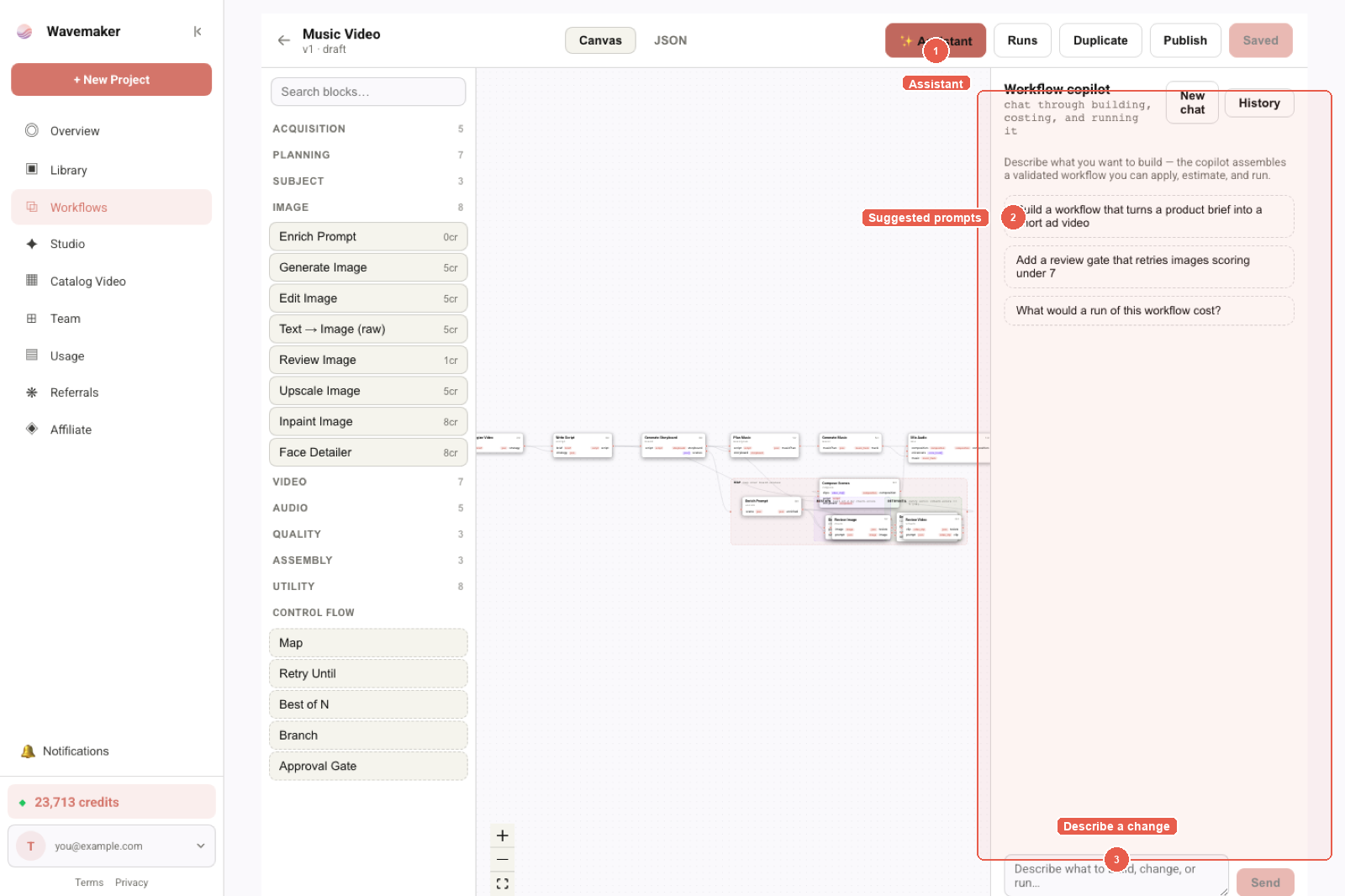
Workflow copilot — describe a pipeline and review the assembled graph.
What builder mode includes (and excludes)
| Included (~35 tools) | Excluded (full mode only) |
|---|---|
draft_workflow, compile/save/publish helpers | generate_video, refine_video, storyboard tools |
run_hub_workflow, estimate_workflow, get_run | Static ads, DCO, catalog video |
| Hub search, favorites, showcase | Workspace composite video tools |
| Training Studio dataset/job tools | Long-tail legacy refinement helpers |
The split keeps agent context windows focused: when you say “wire my product URL workflow into CI,” the model sees run/estimate/idempotency tools — not eighty video-treatment knobs. A deeper tool-by-tool map lives in MCP builder mode deep dive (September).
Use case 1: describe a pipeline, get a compiled workflow
The draft_workflow tool runs the same compiler-in-the-loop agent that powers the in-app copilot: it reads the block catalog, drafts a spec, validates it, and self-repairs until it compiles.
You: “Draft a workflow that takes a product URL, scrapes it, generates three lifestyle images in a warm film look, and animates the best one into a 10-second clip.”
Agent: calls
draft_workflow→ a validated WorkflowSpec with an estimated credit cost, ready to save viacreate_workflow.
Drafting is free — nothing is persisted, no run starts, no credits move. If the description can’t compile, you get the partial spec plus node-level diagnostics instead of an opaque error, so the agent can repair or simplify and try again. That loop is the same one we document for human builders in Natural language workflow copilot.
Use case 2: your workflows become your agent’s tools
This is the part that makes agents feel native: in builder mode, every workflow your org has published — and every Hub workflow you’ve favorited — registers as its own MCP tool at connect time, named wf_<slug>, with the workflow’s typed inputs as the tool schema.
You: “Make a teaser for https://myshop.com/p/123.”
Agent: calls
wf_product_teaser(product_url: "https://myshop.com/p/123")→ run submitted, credits held,run_idreturned.
No prompt engineering about endpoints or payload shapes — the tool schema is the contract. Favorite a workflow on the Hub and it appears in your agent’s toolbox on the next connection (capped at 40 tools; run_hub_workflow covers the whole Hub regardless). Dynamic registration semantics: Dynamic MCP tools for workflows.
REST integrators get the same contract via slug runs — Every workflow is an API endpoint — without MCP at all.
Use case 3: estimate → run → poll, with retry safety
For anything beyond a one-off, the run tools mirror the REST guarantees on /workflow-api:
estimate_workflow(slug, inputs)— the itemized quote (generation credits, BYOK fees, creator premium) before any charge.run_hub_workflow(slug, inputs, idempotency_key, metadata, webhook_url, webhook_secret, version)— submit with exactly-one-hold semantics: a retried tool call with the sameidempotency_keyreplays the original run instead of double-charging.get_run(run_id)— status, per-node progress, per-node credit spend, artifact ids.
Credits are held to the workflow’s envelope and settled to actual on completion — an agent can’t overspend past the quote it showed you. Webhook parameters match POST /w/{slug}/runs; verify signatures before trusting terminal payloads (idempotency and webhooks).
Use case 4: train a custom model from a chat
The Training Studio loop is exposed as tools too:
create_dataset(type: "image", name: "brand-style")add_dataset_items(dataset_id, items: [{ url: "https://…/1.jpg" }, …])— HTTPS URLs are fetched server-side with strict bounds (size caps, content-type checks, private hosts blocked) and every item passes the same moderation scan as uploads.- Start the job over REST or the app; when training finishes you’ll get
training_job.awaiting_checkpoint(webhook) and the agent picks the winner:pick_checkpoint(job_id, epoch)→ a reusable model asset you can bind into any workflow.
Runnable hosts today follow Training Studio docs (krea2 / ltx / wan / hunyuan / elevenlabs paths) — not “any Civitai file executes live.” Import flows: Train a character LoRA and Import Civitai LoRAs.
Use case 5: search the Hub before you fork
search_hub and related list tools let an agent discover remixable Open workflows before drafting from scratch. Pair with estimate_workflow on a slug to compare creator premium lines against a greenfield graph. Marketplace economics (royalties, premium splits) are summarized in AI workflow marketplace economics — agents should treat estimates as authoritative for user-facing quotes.
Troubleshooting builder connections
| Symptom | Fix |
|---|---|
| Browser OAuth never opens | Confirm streamable HTTP URL; Desktop needs mcp-remote shim per connect guide |
Zero wf_ tools after publish | Reconnect MCP; confirm workflow is published, not draft |
| Tool call 401 | Session expired — re-authenticate |
| Estimate differs from run settle | Memo hits on upstream nodes reduced actual; normal on iteration |
Builder mode does not hide billing — every run holds then settles. Agents should surface credits_held from tool results to users before fan-out.
Combining builder with full MCP
Power users mount two servers: builder for draft_workflow + Hub runs, full for generate_video when a brief still needs managed planning. Keep slugs for repeatable products; use managed video for exploratory one-offs. Economics differ — slug runs attribute creator premium and memoize per block; managed video follows composer reserves documented in Automate video creation with the API without duplicating that tutorial here.
For agents reading this
Machine-readable contracts, no auth required:
- OpenAPI 3.1:
https://api.wavemaker.io/api/v1/openapi.json - WorkflowSpec JSON Schema:
https://api.wavemaker.io/api/v1/workflow-spec-schema - Platform overview for LLMs:
https://wavemaker.io/llms.txt(full version:/llms-full.txt)
Where to go next
- Prefer code over agents? Every Wavemaker Workflow Is Now an API Endpoint
- OAuth, clients, and full tool surface: Connect Wavemaker with MCP
- Product positioning: /mcp and /ai-workflow-builder
- Agents that compile pipelines end-to-end: AI agents that build pipelines
Frequently asked questions
- What is Wavemaker's builder MCP mode?
- Append ?tools=builder to the MCP URL (https://api.wavemaker.io/mcp?tools=builder) to get a focused ~35-tool surface for building and running workflows: draft_workflow, run_hub_workflow, estimate_workflow, search_hub, the Training Studio loop, and a dynamic wf_<slug> tool for each workflow you've published or favorited.
- Can my agent create a Wavemaker workflow from a description?
- Yes — the draft_workflow tool runs Wavemaker's compiler-in-the-loop agent: describe the pipeline in plain language and it returns a validated WorkflowSpec (or precise diagnostics if it couldn't compile). Drafting is free; nothing is saved and no run starts.
- How do my own workflows show up as agent tools?
- In builder (and full) mode, every workflow your org has published — plus every Hub workflow you've favorited — registers as its own MCP tool named wf_<slug>, with the workflow's typed inputs as the tool schema. Your agent calls wf_product_teaser(product_url: …) like any built-in tool.
- Do agent-submitted runs support idempotency?
- Yes — run_hub_workflow accepts an idempotency_key parameter that maps to the REST Idempotency-Key header, so a retried tool call never places a second credit hold.
- Where is the general MCP connection guide?
- Client-specific OAuth steps, troubleshooting, and the full ~120-tool surface live in Connect Wavemaker with MCP — this post focuses on builder mode and workflow tools only.