A Tour of the Wavemaker Hub: Run and Remix Production AI Workflows
The Hub is a marketplace of ready-to-run AI video workflows — no model files, no environments. A visual walkthrough: browsing, app pages, cost estimates, forking, favorites, and calling any workflow from your agent.

The Hub is where Wavemaker workflows become products. A workflow is a complete AI production pipeline — research, scripting, image generation, video generation, music, quality gates — built once in the visual builder and published for anyone to run. This is a visual tour of what’s there and how to use it.
What you’re browsing
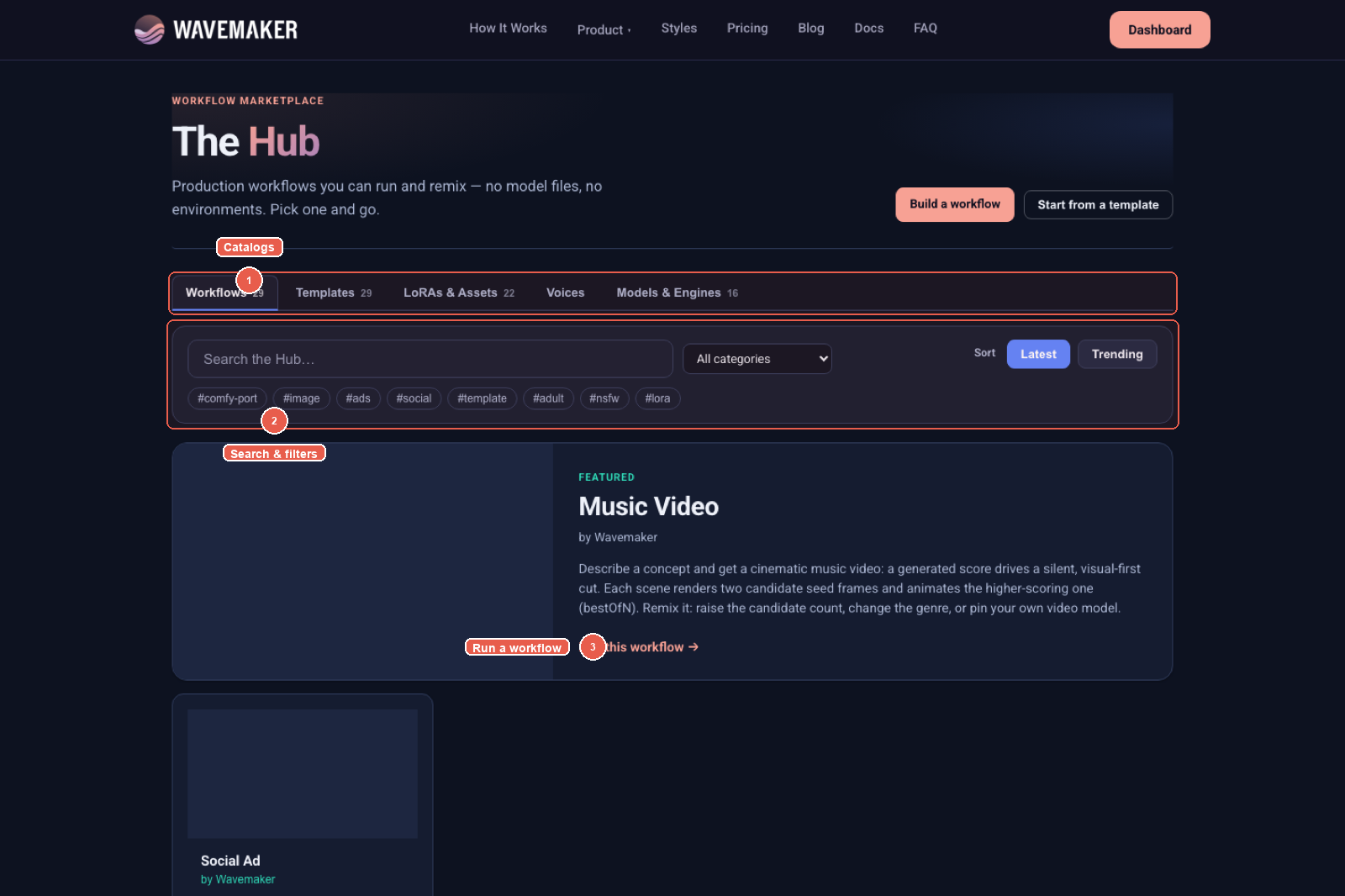
1 catalogs · 2 search & filters · 3 run a workflow.
The Hub is organized into five catalogs, one tab each:
- Workflows — published, runnable pipelines. Each card shows its category, creator, run/fork counts, and whether it’s Free to run (no creator premium) and a Template (remixable starting point).
- Templates — the subset designed to be forked first, run second: solid structures for social ads, product teasers, explainers, listing videos, and more.
- LoRAs & Assets — community-trained model assets (characters, styles) you can bind into your own workflows.
- Voices — designed voice profiles.
- Models & Engines — the image/video/audio engines the platform routes to, so you know what a workflow can pin.
Search, category filters, tag chips, and Latest/Trending sorting narrow it down:
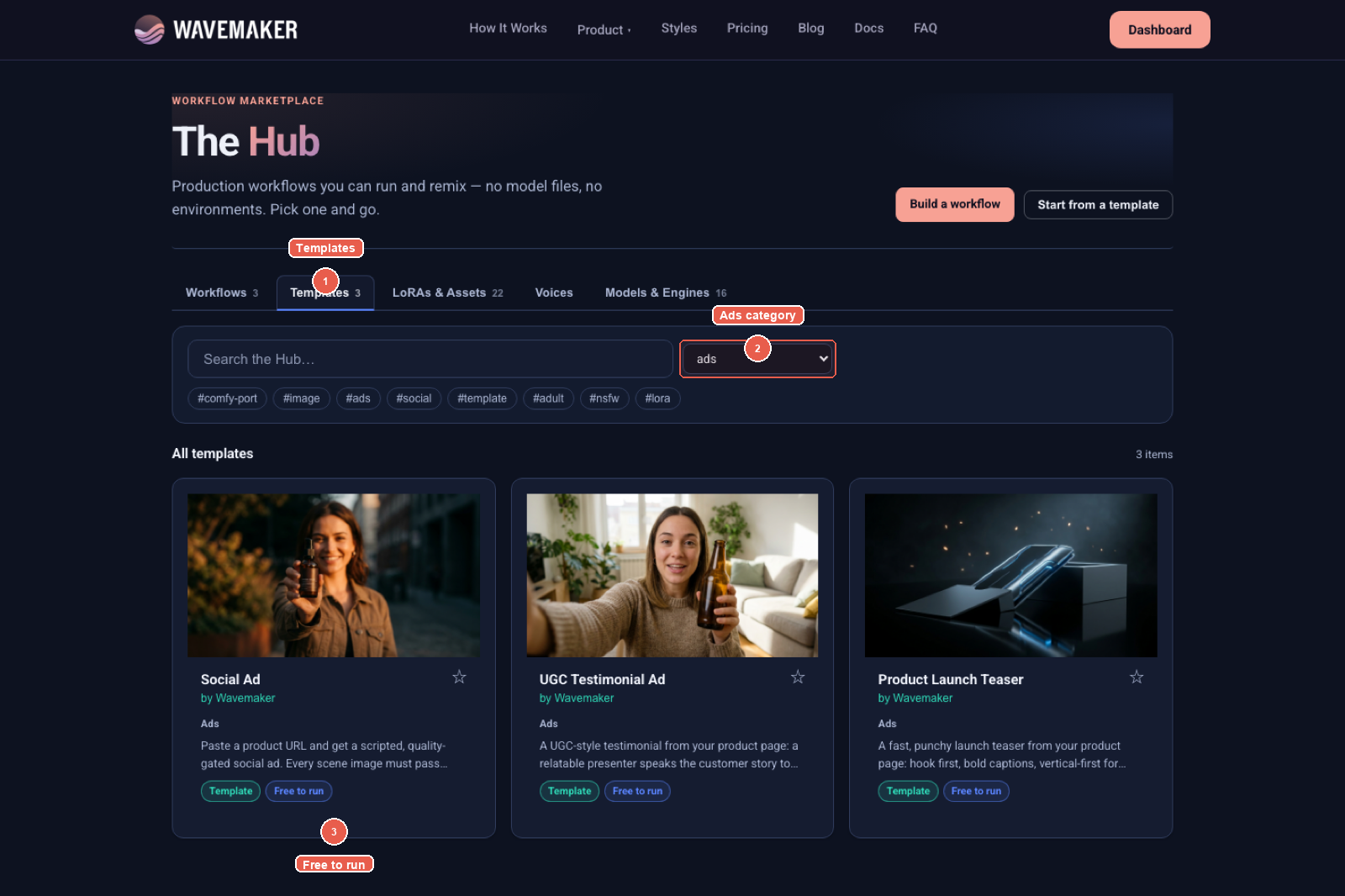
1 Templates · 2 Ads category · 3 remix free.
Every workflow is an app
Click any workflow and you land on its app page — the workflow as a runnable product. The creator’s promoted inputs render as a typed form; everything else about the pipeline (the graph, the models, the quality gates) is packaged behind it.
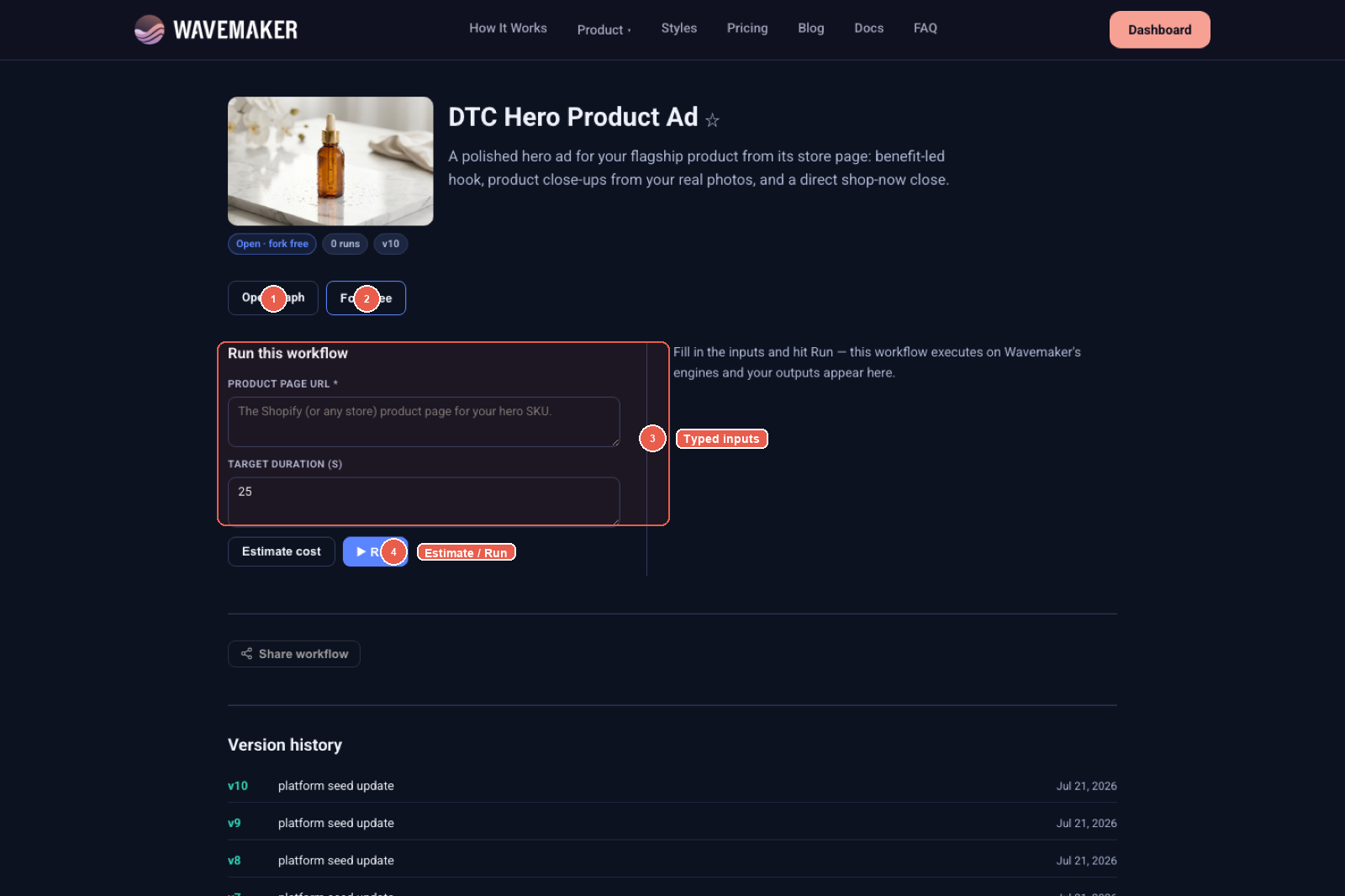
1 View pipeline · 2 Fork free · 3 typed inputs · 4 Estimate / Run.
Four things worth noticing on this page:
- View pipeline — every open workflow lets you inspect a read-only node graph (pan/zoom) on the Hub detail page before you run or fork it. No black boxes.
- Fork free — when the creator marks a workflow open, forking copies the whole pipeline into your workspace, editable node by node.
- Typed inputs — promoted fields become the form, the REST body, and the MCP tool schema.
- Estimate / Run — quote before the credit hold, then execute. Published versions are immutable and listed below; pin a
versionover the API when you need one.
Estimate before you run
Hit Estimate cost and you get the same itemized quote the API returns — the generation envelope, what’s held up front, and a note about BYOK (bring your own provider keys to pay platform fees only on those steps):
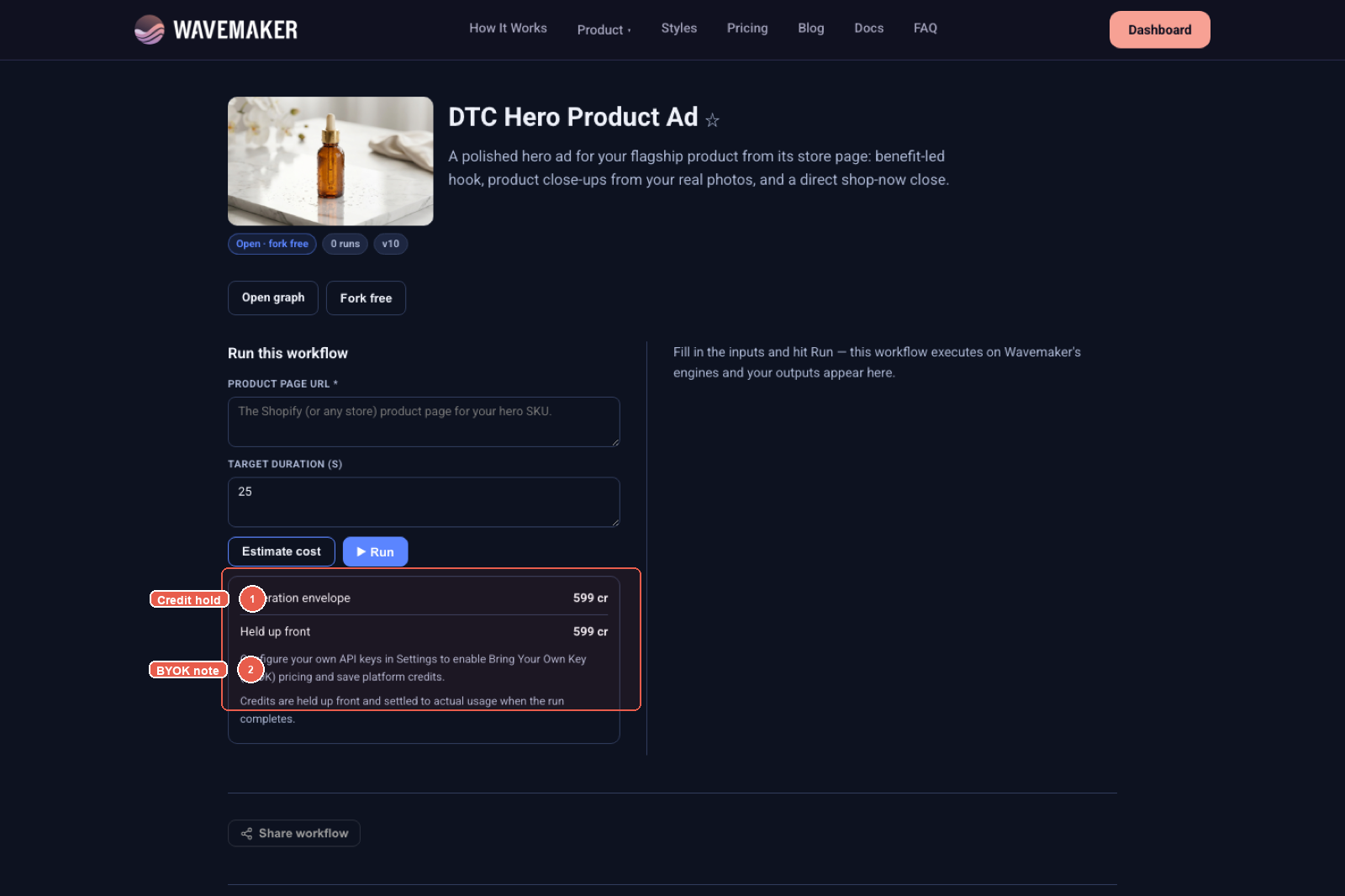
1 credit hold · 2 BYOK note — quote before a credit hold on a slug run.
Credits are held, not spent: the run settles to actual usage when it completes, and a cancelled run keeps only what actually executed. Memoized steps — re-running a workflow whose early nodes didn’t change — re-run free.
Fork it, make it yours
Forking is how the Hub compounds. A forked workflow lands in your workflows list with full edit rights: swap the video model, tighten the review gate, add an approval step before the expensive render, change the music direction. Publish your version and the Hub tracks the remix lineage back to the original — creators see their work spread, and runners see which remixes are gaining traction.
If you’d rather start from a designed starting point than someone’s production pipeline, the Templates tab (or Start from a template right in the Hub hero) gives you remixable structures for the common formats.
Favorites become agent tools
Star a workflow and something useful happens beyond bookmarking: favorited workflows register as typed MCP tools in your AI agent’s toolbox (named wf_<slug>), alongside your own published ones. Connect Cursor or Claude to https://api.wavemaker.io/mcp?tools=builder and your agent can call wf_product_teaser(product_url: …) directly — the workflow’s input schema is the tool schema. Details in Drive Wavemaker Workflows from Your AI Agent.
The same goes for code: every published workflow is a REST endpoint at POST /api/v1/w/{slug}/runs, with idempotent retries, webhooks, and version pinning — the full patterns are in Every Wavemaker Workflow Is Now an API Endpoint.
Where to go next
- Browse the Hub — filter by your industry and run something free.
- The docs deep-dive: Using the Hub and Runs, credits & estimates.
- Ready to build your own? Start with the visual builder tour.
Last updated July 20, 2026
Frequently asked questions
- What is the Wavemaker Hub?
- A marketplace of published AI workflows at wavemaker.io/hub — complete production pipelines (scripting, image gen, video gen, music, quality gates) you can run immediately, fork for free when the creator allows it, or remix into your own version. It also catalogs templates, community LoRAs and model assets, voices, and the models & engines the platform can route to.
- Do I need to set anything up to run a Hub workflow?
- No. Hub workflows run on Wavemaker's engines — no model files, no environments, no GPUs. Open the workflow's app page, fill in its typed inputs, and hit Run. Credits are held up front and settled to what the run actually used.
- What's the difference between forking and running?
- Running executes the workflow as-is from its app page. Forking copies the graph into your own workspace (free when the creator marks it open) so you can edit every node, rewire it, and publish your own version — the Hub tracks the remix lineage.
- Can I run Hub workflows from the API or an AI agent?
- Yes. Every published workflow is a REST endpoint (POST /api/v1/w/{slug}/runs) and an MCP tool. Favorite a workflow and it registers as its own typed tool (wf_<slug>) in your agent's toolbox.