How to Import a ComfyUI Workflow Online (Without Hosting ComfyUI)
Drop ComfyUI API JSON, UI save JSON, or a generated PNG and get a hosted Wavemaker workflow plus an honest import report — transpiled onto platform engines, not executed as Comfy nodes.

Update (2026-08-04): This post describes the legacy managed-import (transpile) lane, which is being retired. Wavemaker’s platform now executes ComfyUI graphs natively on managed GPUs — import your JSON at /comfyui, run it once to verify, and publish it for per-run royalties.
You can import a ComfyUI workflow online at Wavemaker by dropping a .json export or a Comfy-generated PNG at New workflow → Import from ComfyUI. Wavemaker transpiles your graph’s creative intent onto typed platform blocks and hosted engines — it does not run ComfyUI, custom nodes, or pixel-identical samplers on our servers. The overview lives on our ComfyUI import landing; this post is the practical walkthrough.
Who is this for?
This path is for creators who already invested in ComfyUI graphs — prompt recipes, LoRA stacks, img2img polish — and want the same intent hosted, priced, and shareable without maintaining a local GPU stack. If you only need a one-off render inside ComfyUI itself, keep using your desktop install. If you want a link, an app page, review gates, or an API slug, import is the bridge.
What file formats can you drop?
ComfyUI ships more than one JSON shape, and community sharing often skips JSON entirely.
API / prompt JSON
The flat map keyed by node id — what you get from “Save (API Format)” or many automation tools — is fully supported. Wavemaker detects format structurally, not by filename.
UI save JSON
The canvas save with nodes and links arrays is supported too, including older 0.4-era exports with array-style links and positional widget values. The normalizer collapses reroutes, drops muted branches, and converges both shapes on one internal graph before mapping.
PNG with embedded workflow
Every PNG ComfyUI saves carries the workflow in text metadata (sometimes compressed). Extraction runs in your browser: chunk walk, inflate, recover JSON. Image bytes are not uploaded — only the recovered graph goes to the server. Automatic1111 and other tools embed settings differently; you’ll get a specific error, not a silent misread.
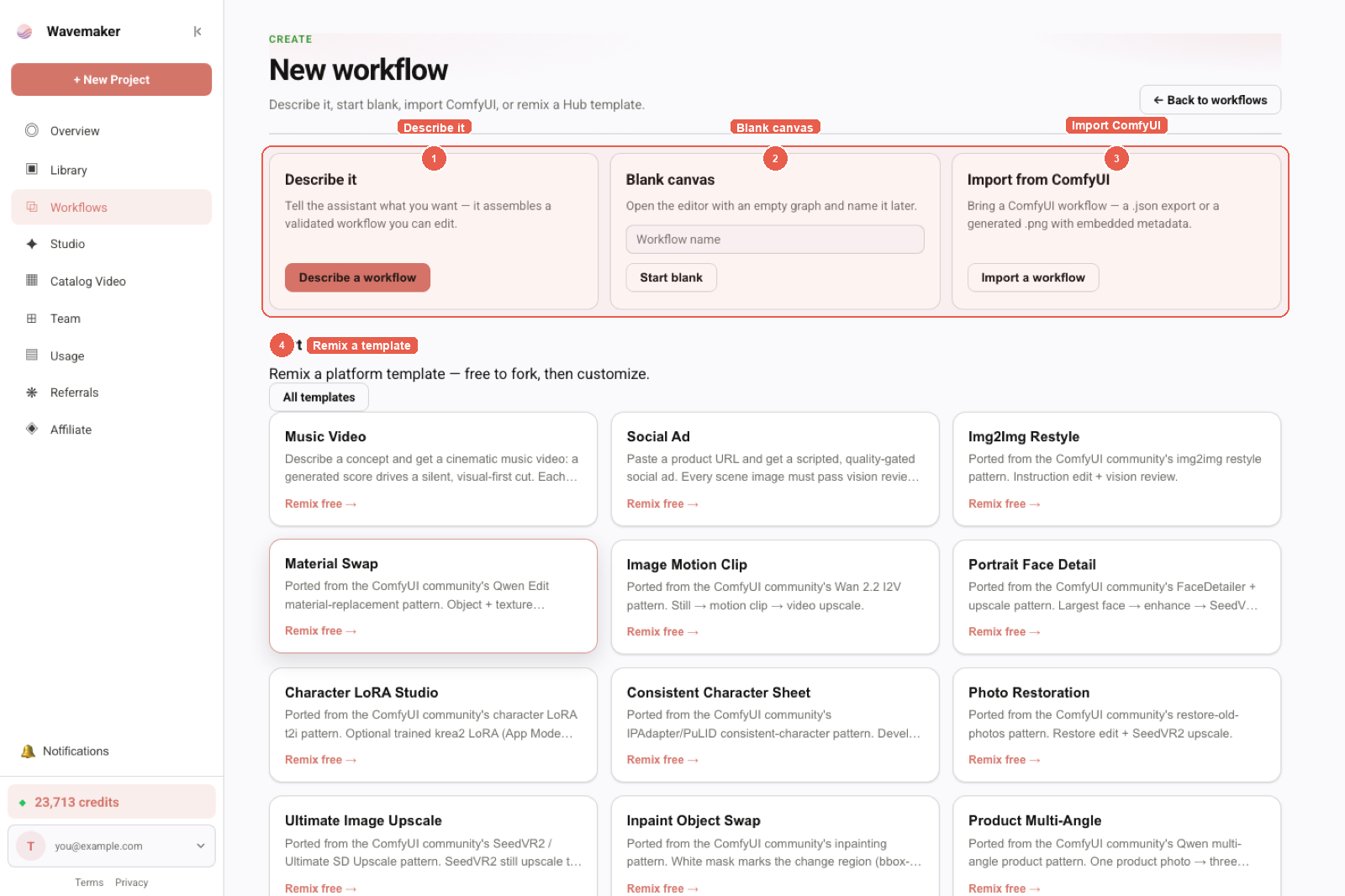
New workflow entry: describe, blank canvas, Import from ComfyUI, or remix a template.
What happens after you drop the file?
The pipeline is semantic transpilation, not execution:

- Normalize the graph into a single internal representation.
- Trace intent from image or video sinks back through decode to the anchoring sampler — t2i vs img2img vs t2v/i2v is classified from the chain shape.
- Collect positive prompt text, LoRA stack, checkpoint/UNET reference, and render dimensions or duration.
- Map to platform blocks: image chains become
text_to_image/edit_image; video chains becometext_to_video/image_to_video(and related); resolutions snap to supported aspect ratios. - Compile through the same validator every hand-built workflow uses — imports should not produce broken graphs.
No Comfy node runs. No custom-node Python loads. For the engineering rationale, read why we transpile instead of hosting ComfyUI.
How do you read the import report?
Before anything is saved, you get a categorized ledger — nothing disappears silently.
| Section | Meaning |
|---|---|
| Assets to resolve | LoRAs or checkpoints we recognized but could not attach. Import assets to Training Studio on a supported base model, then re-import. |
| Approximated | Mapped imperfectly — snapped aspect ratio, img2img rebuilt as an edit block. |
| Not imported | No platform equivalent: ControlNet graphs, custom nodes, subgraphs, secondary sampler chains. Common WAN / AnimateDiff-style video chains do map. |
| Settings without a platform equivalent | Sampler name, CFG, steps (and video seed) — listed as dropped. Image seed and negative prompt can ride when the platform block supports them. |
Goal: same creative intent on platform engines, not pixel parity with your local Comfy render.
How do LoRAs bind on import?
LoRAs are often the whole point of a shared graph. The importer matches filenames against your org library, but matching alone is not enough — a LoRA only attaches if its base-model family has a runnable host on Wavemaker (today that means the Training Studio paths documented for krea2 / ltx / wan / hunyuan / elevenlabs-style hosts, not “any Civitai file runs live”). Unmatched or unsupported-family LoRAs stay in Assets to resolve rather than attaching and silently doing nothing.
Practical order of operations:
- Import LoRAs to your library from Training Studio or
/assets. - Import the Comfy graph.
- Re-run if the report still lists unresolved weights.
What should you do about unmapped nodes?
When ControlNet, custom nodes, or other unmapped residue lands in Not imported (or LoRAs need resolving), the editor opens with the workflow copilot prefilled with that list — not auto-sent. One Send gets platform-native suggestions: a review gate where you relied on a fixed seed for quality, best-of-N where you manually queued eight grids, an approval gate before expensive video steps.
That is intentional: Comfy habits (fixed seed, ControlNet pose lock) often encode quality policy, which Wavemaker expresses as typed control flow instead of sampler knobs.
What do you gain after import?
Import is not merely format conversion.
- Hosted execution — no local VRAM, no Python env, no custom-node dependency hell. Progress is per block on managed engines.
- Quoted runs — itemized price, hard cap, settle-to-actual before you commit credits. See workflows as API endpoints once you publish.
- Production blocks Comfy never had — site research, scriptwriting, multi-scene video, audio mix, export — wired on the same canvas as your image core.
- Distribution — publish to the Hub for an app page, lineage, and optional premium pricing (full publishing guide).
Can you import from the API?
Yes. POST /api/v1/workflows/comfy-import with { "comfy": <JSON> } returns a draft spec, the same import report, and compile diagnostics. Nothing is persisted or charged until you create the workflow with POST /api/v1/workflows. Details are in the public OpenAPI document and the ComfyUI product brief.
How does import differ from hosted ComfyUI tabs?
Some products open ComfyUI in a remote desktop and call that “online.” Wavemaker never loads the Comfy front end for execution. You get a compiled WorkflowSpec, the same artifact hand-built creators use, which means Hub publishing, slug APIs, and MCP tools work the same whether you imported or drew the graph from scratch. If you need literal KSampler widgets in a UI, stay on Comfy; if you need a priced link, import is the front door documented on /comfyui.
Common mistakes to avoid
- Expecting identical pixels — sampler/CFG/steps do not transfer; image seed may — read the dropped-settings section every time.
- Skipping LoRA library prep — import weights first, then the graph.
- Assuming ControlNet or custom nodes carry over — they will not; plan copilot-assisted rebuilds.
- Using non-Comfy PNGs — only Comfy-embedded metadata is supported client-side.
Where to go next
- Pillar overview: Import ComfyUI workflows online
- Engineering deep dive: Why Wavemaker transpiles ComfyUI
- Creator path: From Comfy graph to sellable product
- Step-by-step docs: Building workflows → Importing from ComfyUI
Your graphs were never the problem — they were landlocked on one machine. Drop one in, read the report honestly, and run it where a link is enough.
Frequently asked questions
- What ComfyUI files can I import?
- Both ComfyUI JSON shapes — the API/prompt export and the UI save format — plus any PNG generated by ComfyUI, since the workflow rides in the image's metadata. The PNG is read entirely in your browser; the image itself is never uploaded.
- Will my imported workflow produce identical images?
- No, and we say so up front. The importer carries creative intent — prompts, resolution, LoRAs, image or video structure — onto Wavemaker's engines. Sampler name, CFG, and steps don't transfer; image seed may. The import report lists every dropped or approximated setting.
- What happens to my LoRAs?
- The importer matches LoRA filenames against your Training Studio library and binds anything it finds on a supported base model. LoRAs it can't match or can't host are listed under 'Assets to resolve' — import them at /assets first, then re-import.
- Does importing cost credits?
- No. The import itself is free — you only pay normal per-block credits when you run the workflow, and every run is quoted before it starts.
- What about ControlNet and custom nodes?
- ControlNet graphs, custom nodes, and subgraphs don't import — ComfyUI custom nodes are arbitrary code and Wavemaker never executes them. Common WAN / AnimateDiff-style video chains do map. Unmapped nodes land in the report, and the builder copilot opens prefilled so you can rebuild with platform blocks.