How to Run ComfyUI Workflows Online Without a Local GPU
Run ComfyUI workflow intent online by importing JSON or PNG into Wavemaker — hosted engines, upfront quotes, and honest transpile limits. Not a remote ComfyUI desktop or custom-node runtime.

Run ComfyUI workflows online at Wavemaker by importing your graph and executing the transpiled workflow on hosted engines — no local GPU, no pip install, no custom-node folder. This is not remote ComfyUI: we transpile creative intent and never execute arbitrary Comfy nodes. Overview: /comfyui. Hands-on import: import ComfyUI workflows.
What does “online” mean here?
Three different things get conflated in search results:
| Approach | What runs | Custom nodes | Typical tradeoff |
|---|---|---|---|
| Self-hosted ComfyUI | Your machine or your VM | Yes | Full fidelity, you ops the stack |
| Hosted ComfyUI clouds | ComfyUI runtime in someone’s cloud | Often yes | Closer to desktop Comfy, dependency risk |
| Wavemaker import | Platform blocks after transpile | No | Quoted runs, Hub/API, honest gap report |
Wavemaker is the third row — the easy web path for graphs you already have, not a ComfyUI clone in a tab.
How do you start a run?
- Open New workflow → Import from ComfyUI.
- Drop API JSON, UI save JSON, or a Comfy PNG (metadata parsed client-side).
- Read the import report — dropped sampler/CFG/steps, unsupported ControlNet/custom nodes, unresolved LoRAs (video chains often map).
- Fix assets in Training Studio if needed; use the copilot for unmapped nodes.
- Run — accept the itemized quote, watch per-block progress.
Published workflows skip the editor: open the Hub app page, fill promoted inputs, run. Same engines, same quote model.
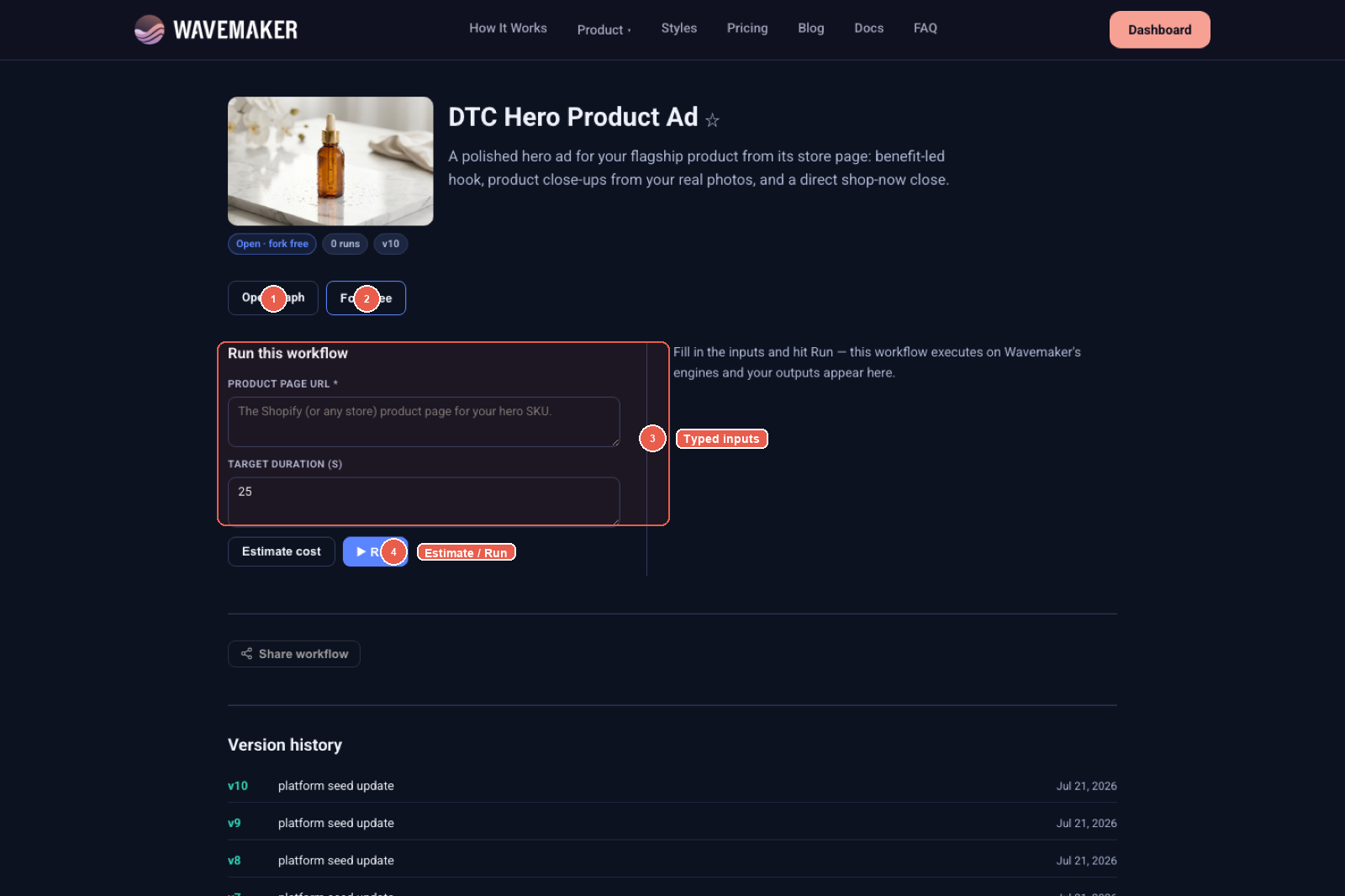
Published Hub app page at /w/{slug} with typed inputs and Run.
What executes on the server?
After import, your graph is a WorkflowSpec — text_to_image, edit steps, review gates, video blocks, etc. The production kernel schedules those blocks on engines we operate (image, video, audio providers configured for your org). No Comfy NODE_CLASS_MAPPINGS, no Python from Civitai node packs.
Implication: if your local magic lived in a custom node or ControlNet stack, it will not run online until you rebuild equivalent policy with platform blocks — the report tells you exactly what failed to map.
How do LoRAs work in online runs?
LoRAs bind when:
- Filename matches your org library, and
- Base model family has a runnable host on Wavemaker (not merely a library import).
Unbound LoRAs appear as assets to resolve — the workflow may run without the adapter you expected. Import weights first, re-import the graph. Details in ComfyUI LoRA workflows explained and /comfyui.
How is pricing different from local Comfy?
Local Comfy cost is opaque electricity + your time + failed queues. Wavemaker runs show per-block credits before start, a hold against a cap, and settlement to actual usage. Publishing lets you set per-run prices for others — see Comfy graph to product.
Can agents and CI run it online?
Yes, after publish:
- REST:
POST /api/v1/w/{slug}/runswith typed JSON body - MCP: dynamic
wf_<slug>tools in builder mode - Idempotency + webhooks for long media — workflows as API endpoints
Import-only API: POST /api/v1/workflows/comfy-import (no charge, no persist) — why transpile.
What does a first online run look like step by step?
Assume you already imported at /workflows/new. Open the workflow, promote at least one text input if your graph expects variable prompts, and attach a cover from a successful run — covers matter when you later publish to the Hub. Click Run, review the modal quote line by line: image blocks, optional review gates, video blocks if you extended the graph. Accept the hold; watch node-level progress rather than a Comfy queue list. When the run completes, outputs land in the run panel and as artifacts you can promote to showcase galleries. If a block fails, diagnostics cite the block id — not an opaque Comfy stack trace — which is the operational difference ops teams feel when they move from desktop queues to typed pipelines.
Who pays when someone else runs your published workflow?
If you publish Open, runners spend their org credits on quoted blocks; you earn royalties when they remix according to Hub rules. Premium runs charge your list price per execution plus underlying engine costs handled by the platform settlement. Imported graphs follow the same economics as native graphs — import is not a discount tier. Creators sometimes under-price early runs; use the quote preview on your own account before setting Premium tiers.
How do org permissions affect online runs?
Runs consume credits from the org that owns the workflow. Imported workflows follow the same RBAC and moderation rules as native graphs — there is no bypass because the spec originated in Comfy. If compile fails for your role, fix the graph or ask an admin; re-importing will not change permissions. Guest trial eligibility for certain blocks is evaluated at run time on the platform kernel, independent of Comfy’s local queue.
Can you schedule or batch online runs?
Published slug APIs support idempotency keys so CI can retry without double spend. For batch still generation, promote list inputs and use Map groups in the builder after import rather than Comfy batch nodes (which often depend on custom nodes anyway). Webhooks notify when long video steps complete — patterns documented in workflows as API endpoints.
When should you NOT use this path?
Stay on local or hosted ComfyUI if you require:
- Pixel-identical reproduction with a specific sampler/CFG stack
- ControlNet or niche custom nodes with no platform mapping
- Exact Comfy subgraph / blueprint fidelity (we flatten; containers are residue)
Wavemaker is for taking portable intent online with production wrapping — gates, video, audio, monetization — not emulating every node ever written.
Can you mix imported Comfy cores with native templates?
Yes — many teams import a t2i/img2img core, then splice outputs into a Music Video or Social Ad template from /workflows/new. The compiler enforces port types at merge time; if a port mismatch fails, fix wiring in the editor rather than re-exporting Comfy. This pattern keeps Comfy R&D at the center while product packaging uses platform templates documented in the visual workflow builder tour.
Troubleshooting first runs
- Everything looks softer/different — read dropped settings; expect engine differences.
- LoRA didn’t apply — check unresolved assets and runnable base families.
- Import failed on PNG — confirm Comfy provenance; see PNG workflow metadata.
- Half the graph missing — custom nodes don’t import; open copilot prefilled list.
More: ComfyUI workflow troubleshooting.
Runners on mobile networks care about quote clarity more than Comfy power users care about euler a vs euler b — product polish matters once you leave the desktop.
Pre-flight checklist before sharing a link
Confirm the import report has zero surprise Not imported entries you have not addressed. Promote every input runners must supply. Run once with your own credits and once with a teammate org if RBAC differs. Publish only after cover and showcase outputs exist — empty Hub pages erode trust faster than slightly mismatched aesthetics.
Where to go next
- Pillar: /comfyui
- Import guide: Import ComfyUI workflows
- Web alternatives landscape: ComfyUI alternatives, web-based
- Builder tour: Visual workflow builder
Online should mean a link and a quote — not another GPU bill you discover after the fact.
Frequently asked questions
- Does Wavemaker run ComfyUI in the browser?
- No. Wavemaker transpiles your Comfy graph onto typed platform blocks and runs those on managed engines. ComfyUI itself, custom nodes, and ControlNet stacks are not executed on our servers.
- Can I run someone else's Comfy workflow from a PNG?
- If the PNG was saved by ComfyUI with embedded workflow metadata, yes — extraction happens in your browser and the graph imports like JSON. Other tools' PNG metadata formats are not supported.
- Will online runs match my local Comfy output?
- Not pixel-for-pixel. Sampler name, CFG, and steps do not transfer; image seed may. The import report lists dropped settings. Intent — prompts, LoRAs on runnable hosts, image or video structure — is what carries.
- How much does an online run cost?
- Each run is quoted per block before execution, with a hard cap and settle-to-actual billing. Import is free; you pay when you run or when others run your published workflow.