From ComfyUI Graph to Sellable Product, No GPU Required
Import a ComfyUI workflow, harden it with review gates, and publish to the Hub — a shareable app page, optional per-run pricing, LoRAs on runnable hosts, and lineage — without hosting ComfyUI or custom nodes.

You can turn a ComfyUI graph into a sellable, hosted product by importing it at Wavemaker, hardening it with platform blocks, and publishing to the Hub — without asking runners to install ComfyUI or execute your custom nodes. Wavemaker transpiles intent onto typed engines; it does not promise pixel-identical Comfy output. Start from /comfyui for the capability overview; this post is the creator arc from .json to URL.
Why do Comfy workflows stall as products?
The usual ComfyUI sharing story is familiar: you perfect a graph — LoRA stack, prompt scaffolding, img2img polish — then distribute a JSON, a model list, a README, and hope the recipient owns a GPU, matching node versions, and patience for dependency hell. Your weeks of tuning stay locked behind the steepest setup in generative media.
ComfyUI import removes the install barrier. Publishing turns the hosted graph into something with terms: price, visibility, lineage, and API access.
Step 1: Import — what actually carries over?
Drop API JSON, UI save JSON, or a Comfy-generated PNG at New workflow → Import from ComfyUI. The importer rebuilds prompts, resolution class, LoRA references, and t2i vs img2img structure as a compiled workflow on managed engines.
Read the report every time:
- Dropped: sampler, seed, CFG, steps — not silent
- Not imported: ControlNet graphs, custom nodes, subgraphs (video chains often map)
- Approximated: snapped aspect ratios, edit-block img2img
- Unresolved assets: LoRAs/checkpoints to import first
Prerequisite that saves hours: load LoRAs into Training Studio on runnable base families (see /comfyui for what actually executes vs library-only imports), then import the graph so bindings stick.
For engineering detail, see why we transpile instead of running Comfy.
Step 2: Harden — encode quality policy in the graph
Comfy quality control is often manual: queue eight, pick one, remember the seed that worked. On Wavemaker, policy becomes blocks:
- Review gates score outputs against your prompt and retry failures within budget.
- Best-of-N generates candidates and keeps the winner — your grid habit, automated.
- Approval gates pause before expensive video or long runs — useful for client sign-off.
- Downstream media — video clips, voiceover, music, assembly — extend where Comfy stopped at stills.
The copilot opens prefilled with import gaps. A review gate frequently replaces what a fixed seed was really doing: protecting a look you already validated. ControlNet does not import; pose locks often become reference images plus edit blocks or human approval — stated plainly, not hidden.
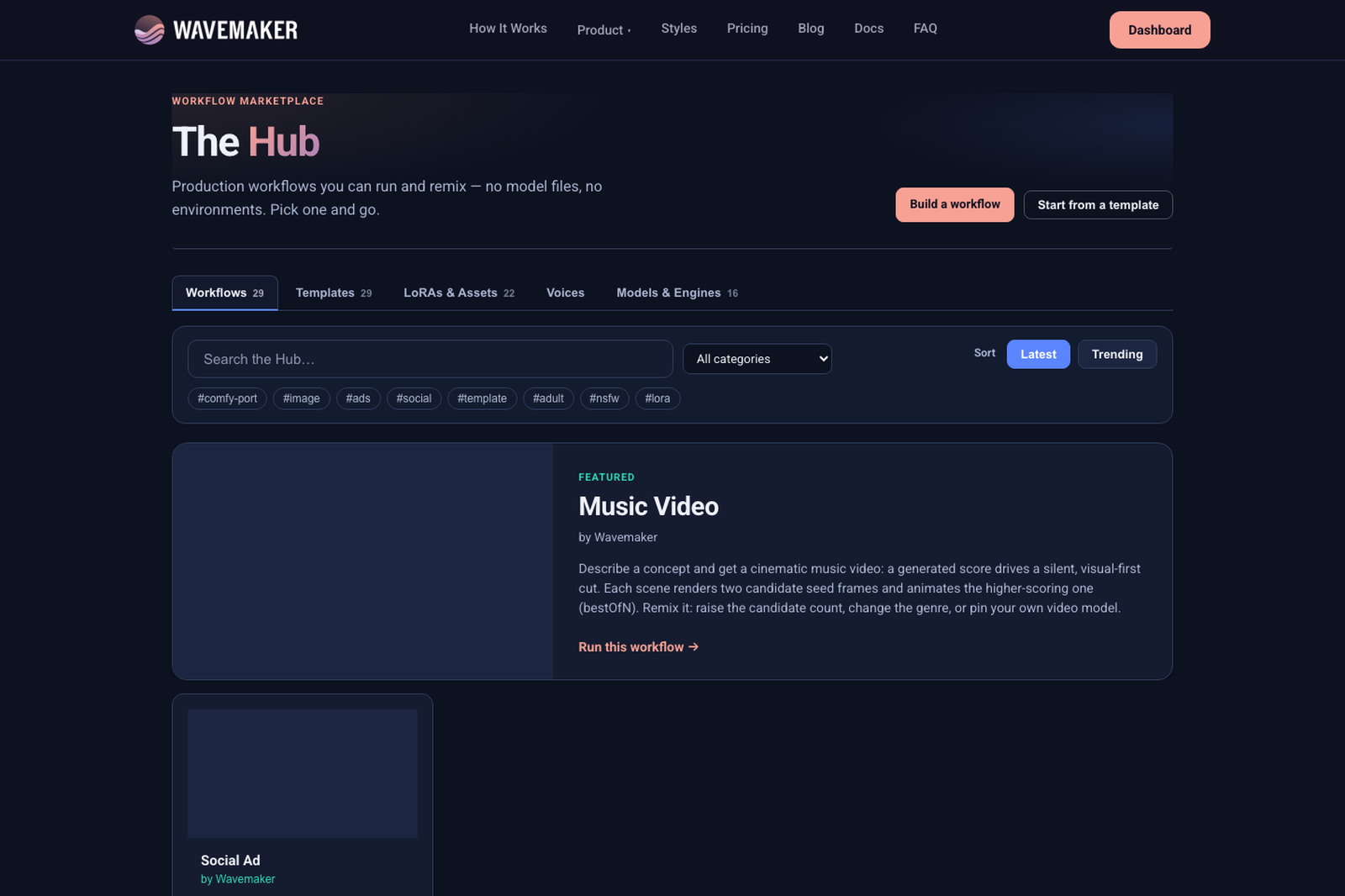
Hub catalog — browse runnable workflows and assets.
Step 3: Promote inputs — one schema, three surfaces
Open the spec panel and promote inputs with types (text, string, number, enums). Those fields become:
- the form on your Hub app page,
- the body of
POST /api/v1/w/{slug}/runs, - the schema for MCP
wf_<slug>when agents connect.
Outputs declare deliverables (images, videos, artifacts). Pick a cover from a real run — it is your workflow’s face in discovery.
Nothing runs uncompiled: saves validate types, wires, and budgets. Same compiler is available in CI via POST /api/v1/workflows/compile.
Step 4: Publish — app page vs zip file
Publishing replaces “here’s my JSON” with wavemaker.io/w/your-workflow: input form, live itemized quote, outputs gallery, remix lineage.
Choose terms:
| Mode | Runner experience | Creator economics |
|---|---|---|
| Open | Free to run and fork; lineage points to you | Royalties when others build on your graph |
| Premium | Per-run price you set; graph can stay hidden | Per-run credits + optional clone pricing |
Premium hidden graph matters for Comfy refugees: your prompt craft and LoRA weighting — the asset you actually spent weeks on — does not have to ship in the export. Runners get results under your inputs, not your recipe.
Immutable published versions mean buyers keep the workflow they reviewed while you iterate the next version separately.
Step 5: Distribute beyond the Hub
A published workflow is also an API product. Slug runs support idempotency keys and webhooks — wire your aesthetic into someone else’s pipeline; every execution hits your pricing and ledger. Deep dive: workflows as API endpoints.
Agents discover published slugs as dynamic MCP tools (?tools=builder mode). Connect patterns: Connect Wavemaker with MCP.
Comfy sharing vs published Wavemaker workflow
| ComfyUI file share | Published Wavemaker workflow | |
|---|---|---|
| Runner setup | Install Comfy + nodes + models + GPU | A link |
| Execution model | Local Comfy runtime | Transpiled platform blocks |
| ControlNet / custom nodes | Whatever you installed | Not imported — rebuild on platform |
| Sampler / seed fidelity | Full local knobs | Dropped — see import report |
| Your IP | Exposed in JSON | Hidden on Premium |
| Quality | Manual curation | Gates, best-of-N in-graph |
| Run cost | Unknown until finished | Quoted upfront |
| Getting paid | Off-platform tips | Per-run + royalties, ledgered |
| Reach | GPU owners | Anyone + API + MCP |
What about workflows that won’t import cleanly?
Heavy ControlNet graphs, AnimateDiff-style video chains, or exotic custom nodes will list under Not imported. That is not a dead end — it is a rebuild brief for the copilot and the visual workflow builder tour. Many creators ship a simpler imported core (prompt + LoRAs + t2i) and add video or review blocks in Wavemaker rather than chasing pixel parity.
How do royalties and lineage work for imported graphs?
Open publishing keeps the graph forkable with lineage stamped server-side — remixers see provenance even when they adapt blocks you mapped from Comfy. When your import required heavy copilot rebuilds, lineage still reflects your published spec, not the raw JSON donors passed around Discord. Premium per-run pricing stacks on the same ledger as native workflows; import provenance does not reduce billing transparency. Runners still see quotes before execution, which is the trust shift from “download my workflow.json” to “run my app page.”
What does a runner see on your Hub app page?
Published workflows are not “download my JSON” links. Runners land on a product page with a typed input form derived from the inputs you promoted in the spec panel — text fields, enums, numbers, optional reference uploads. They see a live quote before anything executes: itemized per block, held to the platform cap, settled to actual usage after the run completes. Outputs appear in a gallery tied to that execution; lineage shows remix provenance when the workflow forked from an Open parent.
Premium mode changes the information boundary. You can hide the full graph so runners never see prompt scaffolding, private LoRA weighting tricks, or internal gate thresholds — they interact only with the inputs you chose to expose and the price you set. That is how Comfy creators protect IP they spent weeks tuning without abandoning hosted execution. Open mode keeps the graph forkable with royalties when others build on your spec; either way, execution remains transpiled platform blocks, not a remote Comfy queue with custom nodes.
Runners also never install your node folder. If your import report listed ControlNet or custom nodes as not imported, the published product reflects what actually mapped — not a silent emulation of desktop Comfy. Set expectations in Hub copy: mention review gates, reference uploads, or video steps that replaced in-Comfy chains. Transparency reduces support tickets and builds trust compared to opaque file shares.
How do API and MCP runners use the same product?
The slug you publish is one contract with three surfaces. Hub runners use the form; integrators call POST /api/v1/w/{slug}/runs with the same JSON Schema body; agents discover wf_{slug} tools when connected in builder MCP mode. Idempotency keys and webhooks let CI pipelines treat your aesthetic like any other microservice — every call hits your pricing and earnings ledger when Premium applies. Deep dives live in workflows as API endpoints and Connect Wavemaker with MCP.
Import provenance does not change those mechanics. A graph that began as Comfy JSON still compiles through the same validator, still quotes upfront, and still memoizes upstream blocks on iterative edits. The creator arc is: transpile intent, harden with gates, promote inputs, publish once, distribute everywhere. Pillar reference: /comfyui.
A practical twenty-minute first publish
- Pick the graph you already trust — not a new experiment.
- Import LoRAs to Training Studio on runnable hosts.
- Import the Comfy file; read the report aloud once.
- Let the copilot suggest gates for anything unsupported.
- Run twice; promote inputs; set cover from the better output.
- Publish Open to validate demand, then Premium if you want hidden graphs.
Where to go next
- Import walkthrough: Import ComfyUI workflows online
- Run without local GPU: Run ComfyUI workflows online (companion post)
- Pillar: /comfyui
- Publishing terms: Publishing & earning
- Hub discovery: Tour of the Workflow Hub
Your best graph deserves a URL, a quote, and runners who never touch pip install.
Frequently asked questions
- Can I run my ComfyUI workflow without a local GPU?
- Yes — import it at /workflows/new and it runs on Wavemaker's hosted engines after transpile. No local install, no VRAM limits, no custom-node dependency management; you pay per run in credits, quoted before anything executes.
- Can I charge people to run my imported workflow?
- Yes. Publish it as Premium and set a per-run price (1–1,000 credits); Wavemaker handles billing and your earnings ledger. Or publish Open — free to run and fork, with royalty when others build on it.
- Do people who run my workflow see my prompts?
- That's your choice. Premium workflows can keep the graph hidden — runners see the inputs you promoted, the price, and the outputs, not your full prompt engineering or private LoRA weights.
- How do my custom LoRAs come along?
- Import them to Training Studio for a supported runnable base model, then import the Comfy graph — matching LoRAs bind automatically and travel with the published workflow. Runners don't need their own copy.
- What if my workflow uses nodes that don't import?
- The import report lists ControlNet graphs, custom nodes, and subgraphs as not imported (common WAN/AnimateDiff-style video chains usually map). The builder copilot opens prefilled to suggest platform-native replacements — review gates and best-of-N often replace what fixed seeds or ControlNet passes were doing.