Train a LoRA Online Without a Local GPU
Use Wavemaker Training Studio to train image, video, and voice LoRAs on hosted GPUs—pick your epoch, bind into workflows, and skip the Python stack entirely.

You can train a LoRA online without a local GPU by uploading a curated dataset to Wavemaker Training Studio, starting a hosted job, picking the checkpoint that generalizes best, and binding that version into any workflow. The platform owns GPUs, moderation, and checkpoint grids—you own creative choices (dataset, epoch, weight).
Why “no GPU” still needs honest expectations
Local LoRA culture assumes you control PyTorch, CUDA drivers, and a folder of .safetensors checkpoints. That freedom comes with ops work: environment drift, VRAM math, and silent corruption when a run dies halfway through epoch 40.
Training Studio inverts the contract:
- Hosted execution on engines Wavemaker already operates for production workflows—not an arbitrary ComfyUI stack on a rented VM.
- Typed jobs (
image_lora,video_lora,wan_pair,voice) with preset bounds so learning rate and rank stay in safe envelopes unless you deliberately open advanced settings. - Visible pricing before the job starts: image LoRA from ~60 credits, video from ~200, voice ~30 at default step counts (overages apply if you raise steps).
What you do not get is “any Civitai LoRA runs here.” Imported Flux/SDXL files land in your library for provenance and future mounting; runnable training today follows the krea2/ltx/wan/hunyuan/elevenlabs matrix documented on the LoRA training landing page.
The four-step loop (browser to bound asset)
The whole path is visual and repeatable—agents can mirror it via REST/MCP, but humans usually live in the Studio tabs.

1. Datasets without a /datasets folder on disk
Open /assets → Datasets. Create an image, video, or voice dataset, then upload files or promote your own recent run outputs (the generate → curate → train loop). Items stay pending until ingest + moderation pass; photoreal faces are allowed when you hold rights, with hard blocks only on prohibited classes.
Captions matter more than raw count. Auto-captioning runs after scan; edit captions so what varies (pose, wardrobe, lighting) is described while your trigger token stays stable. Eight excellent images beat eighty duplicates.
2. Start a training job on managed hardware
On Train, choose dataset + job type + preset (character, style, product, motion, narration). The UI shows the training hold before submit. While the job runs, {phase, pct} updates—so “stuck or stepping?” has an answer without SSH.
Runnable backends align with product docs: image jobs target krea2/ltx families; video jobs use wan/hunyuan paths; voice requires the consent record described in voice training with consent. Advanced knobs exist, but defaults exist because most first runs should succeed, not tune.
3. Pick an epoch—never trust the last grid by default
When epochs complete, each checkpoint renders a sample grid with identical prompts and seeds. Compare grids side by side; the winner becomes a version on your asset. Wavemaker deliberately does not promote the last epoch automatically—that epoch often memorizes training selfies and collapses on new prompts.
This design pairs with the epoch selection guide and later blind A/B evaluations if you train v2.
4. Bind into workflows, Hub, or cast packs
Library assets pin to workflow nodes by version. Published workflows keep those pins—improving the asset later does not silently change a shipped graph. Optional Hub publish runs moderation + provenance attestation; cast packs bundle multiple pins for multi-character shoots (cast packs guide).
For character consistency across long-form video (subject refs, LoRAs, casting choices), see the dedicated explainer at /blog/consistent-characters-across-scenes/—this post stays focused on training, not every consistency tactic.
Credits, refunds, and testing costs
Training holds cover the job; generating with your picked LoRA bills normal workflow credits. Failed training jobs auto-refund the training hold. Testing a checkpoint grid is part of training UX; heavy production batches after bind use the same per-block quotes as any other workflow run.
If you import weights instead of training, remember library-only Flux/SDXL imports do not consume training credits—but they also do not execute until mounted. Train on-platform when you need a runnable asset today.
API and agent parity
Everything above exists as REST (POST /api/v1/datasets, POST /api/v1/training-jobs with optional webhooks) and MCP tools (create_dataset, add_dataset_items, pick_checkpoint). Webhooks emit training_job.awaiting_checkpoint when grids are ready—agents should pause for human or policy-driven epoch choice, not assume final epoch.
Pair agent automation with workflow API endpoints when you want train → bind → slug-run in CI.
Comparison table: local GPU vs Training Studio
| Concern | Local Comfy/Kohya stack | Training Studio |
|---|---|---|
| Hardware | You buy/maintain GPU | Hosted krea2/ltx/wan/hunyuan/elevenlabs paths |
| Checkpoint choice | Manual folder of .safetensors | Grids per epoch; explicit pick |
| Safety | Your responsibility | Fail-closed moderation + voice consent gates |
| Workflow use | Manual loader nodes | Version-pinned bindings + cast packs |
| Flux/SDXL Civitai imports | Often runnable locally | Library-only on Wavemaker until mount ships |
Common mistakes when moving off a home GPU
Skipping caption edits. Auto-captions are a starting point, not ground truth. Vague captions teach vague LoRAs.
Training on unlicensed likeness. Character recipes require rights confirmation; recognizable people need consent. Moderation enforces fail-closed behavior—do not treat the checkbox as theater.
Assuming imported Civitai files run. Match filename to library entries during ComfyUI import or Civitai import; runnable execution requires a trained asset on a supported base or an mounted engine family.
Never evaluating weight. Training gets you a checkpoint; strength tuning still matters at inference time.
Guided path: character pack recipe
If you want a scripted first run, use Train a character pack (/assets?recipe=character): dataset → uploads → image_lora on krea2 → pick checkpoint → fork/bind a workflow → optional publish. It is the supported answer to “I don’t want to assemble tabs manually.”
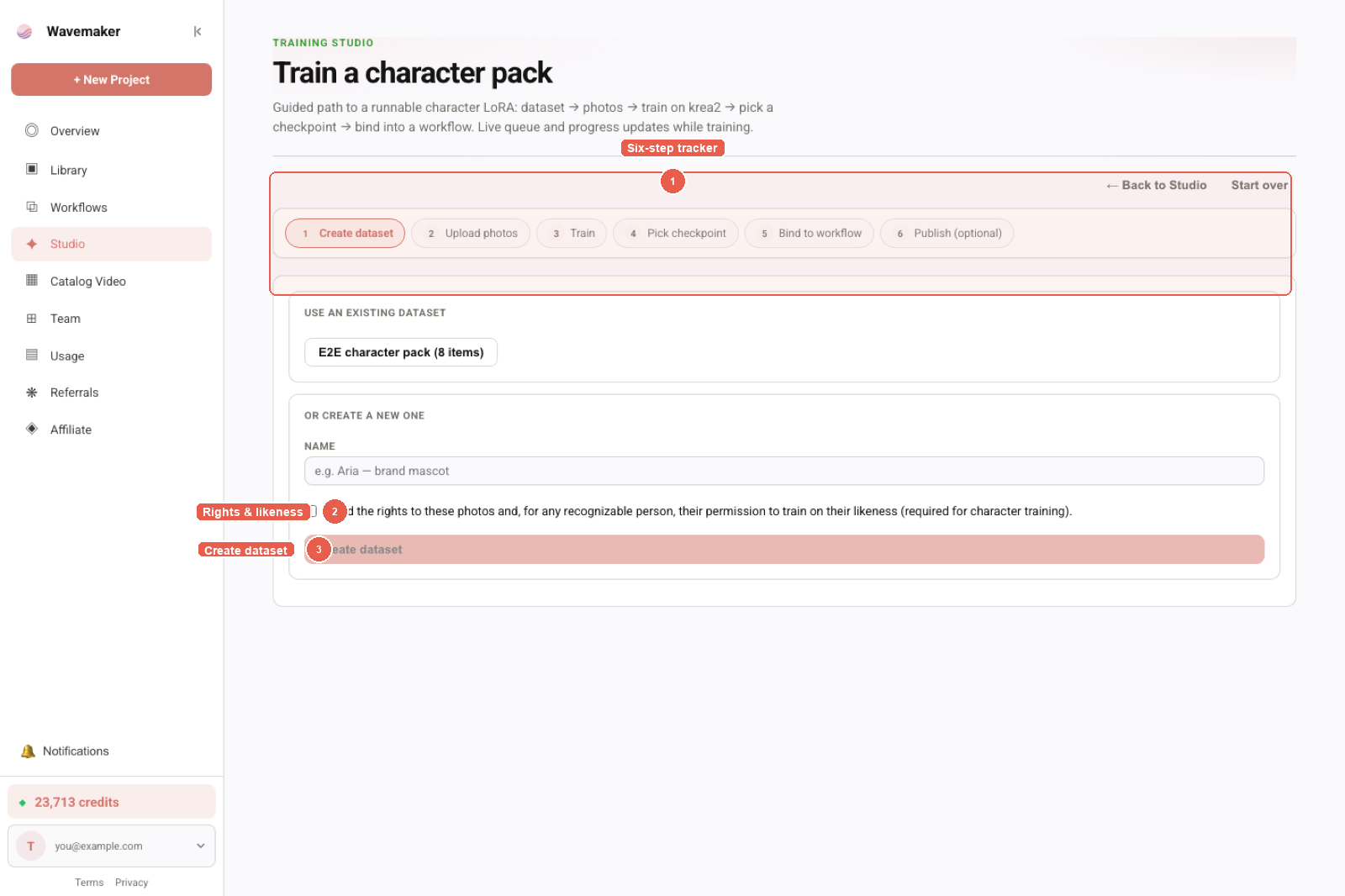
Training Studio recipe — dataset, recipe, and train controls.
Presets, job types, and when to choose each
Training Studio exposes presets so you do not have to reverse-engineer hyperparameters on day one. Character presets bias toward identity retention; style toward palette and brush language; product toward geometry and label stability; motion and narration route you toward video and voice job types respectively. Switching preset does not bypass moderation or consent—it changes safe defaults inside the same registry that powers pricing quotes.
Image LoRA remains the default on-ramp for most creators because krea2 bindings attach to the widest set of Hub templates today. Video and voice are parallel tracks: attempting to “save money” by training only image LoRA when your deliverable is Wan motion usually fails—plan video LoRA training instead of forcing one checkpoint to do everything.
Webhooks, idempotency, and production train loops
When training becomes part of a pipeline (nightly SKU refreshes, cast refresh after a photoshoot), treat checkpoint pick as a human or policy gate in the graph. The training_job.awaiting_checkpoint webhook is the correct pause point: your orchestrator can open a review UI, attach grid thumbnails to a ticket, and call pick_checkpoint only after approval. Auto-picking the highest epoch number is an anti-pattern Wavemaker deliberately does not implement.
Hold idempotency on the training job submit itself if your CI retries POSTs—duplicate jobs burn credits even when refunds exist for hard failures. Pair training webhooks with workflow API slug-runs only after bind completes so you never generate ads against unpicked weights.
Troubleshooting hosted training without SSH
| Symptom | Likely cause | What to do |
|---|---|---|
| Items stuck pending | Scan/ingest backlog or failed moderation | Open item detail; fix or remove; use rescan where offered |
| Job failed immediately | Dataset below minimum or checklist incomplete | Re-read readiness panel |
| Grids look identical epoch to epoch | Dataset too homogeneous | Add angles/lighting; fix captions |
| Bound LoRA weak in app | Wrong epoch or weight | Revisit epoch pick and strength |
| Import “works” but graph silent | Library-only Flux/SDXL | Train krea2 or wait for mount (compatibility) |
Because you cannot shell into a pod, logs are productized: phase names, percentages, and structured job errors. Escalate with job id and org id—not raw stack traces you will never see.
Security and org boundaries
Datasets and assets are org-scoped. Cast packs, Library imports, and training outputs stay inside the org that paid for the job unless you publish to Hub under moderation. Do not train on leaked private datasets “just to test”—moderation exists to reduce platform risk, not to nag legitimate studios.
Voice and likeness paths add consent records; image character paths add rights checkboxes. Treat those as part of the training interface, not legal boilerplate to bypass.
Where to go next
- Pillar overview: Train LoRA online
- Deep product doc: Training Studio
- Dataset quality: LoRA dataset preparation
- Character-specific training: Train a character LoRA
- Put assets in graphs: Workflow builder tour
Frequently asked questions
- Can I train a LoRA online without owning a GPU?
- Yes. Wavemaker Training Studio runs image LoRAs on hosted krea2/ltx paths, video LoRAs on wan/hunyuan backends, and voice clones on the ElevenLabs path—all from the browser at /assets. You pay training credits (image from ~60, video from ~200, voice ~30) plus normal generation when you test outputs.
- Which LoRA base models actually run on Wavemaker today?
- Runnable training and inference paths today are krea2, ltx, wan, hunyuan, and elevenlabs (voice). Flux and SDXL weights you import from Civitai are library-only until an engine mount ships—they catalog and attestation, but do not execute on platform GPUs yet.
- Does Wavemaker automatically use the last training epoch?
- No. Every epoch saves a checkpoint with a comparable sample grid (fixed prompts, locked seeds). You review grids and pick the winner; unpicked checkpoints expire after 14 days. The final epoch is often overcooked, so auto-last would hide quality problems.
- Do I need a paid plan to train?
- Training jobs require a paid plan. Failed jobs auto-refund their training hold; successful runs settle to the quoted training price shown before you start.